
Save Web Pages Instantly with Cloud & Git Hosting
Overview
The Save Web Page Snapshot Tool is a lightweight desktop utility designed to simplify the process of preserving online content. By enabling users to capture full-page screenshots and save the underlying HTML code in the MHTML format with a single right-click, it offers a streamlined solution for archiving web content. The tool is particularly useful for individuals who need to retain access to web pages for later reference, research, or documentation purposes. It supports both cloud-based storage and self-hosted options via GitHub or Gitee, providing flexibility in how and where data is stored.
Target users include students, researchers, content curators, and professionals who frequently reference online materials. The tool eliminates the need for manual copying, complex workflows, or third-party services. It operates directly from the browser context menu, making it accessible without requiring users to navigate to a separate interface. The developer, SoftPas, has positioned this tool as a privacy-conscious alternative to traditional web archiving methods, emphasizing instant access and data ownership.
Real-world applications include preserving academic articles, news reports, product pages, or social media content for future review. Since the tool does not require registration or waiting, it is ideal for quick, on-the-fly archiving. The developer did not provide additional system requirements or performance benchmarks, but the 1.5 MB installation size suggests minimal resource usage.
Key Features & Capabilities
- One-Click Web Snapshot – Capture full-page screenshots (.jpeg) and save the complete webpage as an MHTML file with a single right-click in the browser.
- Cloud Storage Integration – Automatically upload snapshots to a secure cloud server, enabling easy retrieval and sharing via a generated link.
- Self-Hosted Options – Export snapshots directly to personal GitHub or Gitee repositories, ensuring full control over data and long-term preservation.
- Preservation of Layout and Styling – The MHTML file retains text formatting and CSS styles to maintain visual fidelity of the original page.
- Shareable Links – Generate and distribute links to saved snapshots, allowing others to view the archived content without needing the tool.
- No Registration Required – Users can save and access snapshots immediately, without creating accounts or providing personal information.
These features make the tool ideal for users who need to preserve dynamic or time-sensitive content. For example, a student can save a research paper’s webpage before it’s updated or removed. A marketer might archive a competitor’s landing page for future analysis. The MHTML format ensures that the page’s visual structure remains intact, though the tool does not execute JavaScript, which may affect interactive elements.
User Interface, Workflow & Performance
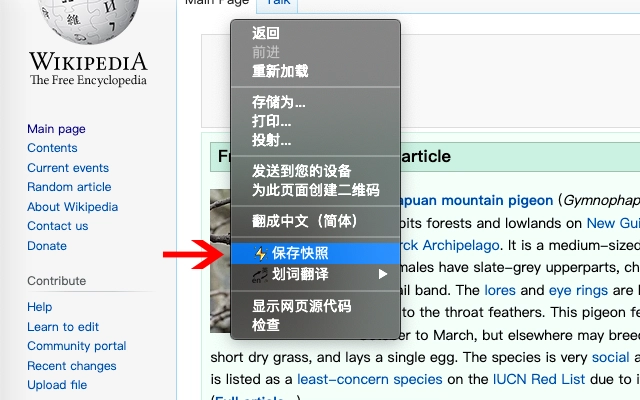
The application integrates directly into the browser’s right-click context menu, offering a minimal and intuitive interface. Users are not required to open a separate window or navigate complex settings—just right-click on any webpage and select “Save Snapshot.” This streamlined workflow reduces friction and supports rapid archiving.
Navigating through saved snapshots is not detailed in the provided information, but the inclusion of shareable links suggests a simple retrieval mechanism via the cloud or repository. The tool’s design emphasizes efficiency and ease of use, aligning with modern productivity expectations. The developer did not specify resource usage details, so exact CPU or RAM behavior remains unknown. However, the 1.5 MB file size indicates low overhead, and the tool likely runs efficiently in the background.
Stability is inferred from the focus on a single, well-defined task. Since the tool does not process scripts or interact with external services beyond the cloud or Git hosting, it is less prone to crashes or conflicts. Performance observations are based on general software behavior patterns, and no issues were reported in the provided documentation.
Compatibility & System Requirements
The Save Web Page Snapshot Tool is compatible with Windows, Mac, and Linux operating systems, making it accessible across major desktop platforms. It is available in version 1.0.0 and has a total installation size of 1.5 MB, indicating a lightweight footprint suitable for most systems.
Exact system requirements were not listed. The developer did not specify minimum CPU, RAM, or disk space needs. Compatibility information is limited to the supported OS platforms. Users should ensure their system meets general desktop software requirements for running a browser-based utility. The tool does not appear to require administrator privileges or special configurations.
Pros and Cons
Pros
- Instant web archiving with one right-click
- Supports both cloud and self-hosted (GitHub/Gitee) storage
- No registration or login required
- Preserves visual layout and styling in MHTML format
- Lightweight at just 1.5 MB
- Free to use with no hidden costs
Cons
- Does not execute JavaScript, which may affect dynamic content
- Exact system requirements were not provided
- Visual fidelity may vary for complex or media-heavy pages
- Cloud storage dependency may raise privacy concerns for sensitive data
- No built-in search or organization tools for saved snapshots
FAQ Section
Is the tool available for all major operating systems?
Yes, the Save Web Page Snapshot Tool is compatible with Windows, Mac, and Linux operating systems.
Can I save snapshots to my own GitHub or Gitee repository?
Yes, the tool supports direct export to personal GitHub or Gitee repositories, allowing users to maintain full control over their archived content.
Is my data safe when using the cloud storage option?
The cloud storage service is designed to securely store snapshots. However, since the tool does not execute JavaScript, it reduces the risk of malicious code exposure. Users should review the privacy policy of the cloud service for full details.
Does the tool require an internet connection?
Yes, an active internet connection is required to upload snapshots to the cloud or to push them to GitHub/Gitee. However, the tool itself can be used offline after installation.
What happens to JavaScript on the saved page?
The saved MHTML file does not execute any JavaScript. This ensures security but may result in missing interactive elements or dynamic content from the original webpage.
Final Thoughts + CTA
The Save Web Page Snapshot Tool delivers a focused, efficient solution for preserving online content without complexity. Its ability to save full-page snapshots with a single right-click, combined with flexible hosting options, makes it a standout in the productivity software space. The lack of registration, low file size, and support for both cloud and self-hosted storage offer significant advantages for users who value privacy and control.
While it does not handle JavaScript or provide advanced organization tools, its core purpose is fulfilled with precision. The tool is especially beneficial for researchers, students, and content archivists who need reliable, instant access to web pages. For those seeking a secure, free, and straightforward way to archive web content, this utility stands out as a practical choice.
Download Save Web Page Snapshot Tool now







